Setting up your foundational structure
Plant
What a Plant is
A Plant is the top node in a branch of the structure. It contains Asset Groups and Assets and exists
to hold a separate section for a specific organisational unit. Use it to set the start of the structure —
for example, a product line, plant, or other logical top node:
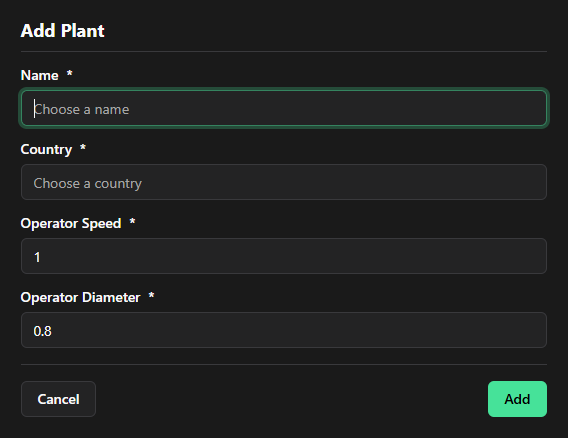
Operator settings on a Plant
Two operator-related values are set on the Plant and apply to all Asset Groups beneath it:
- Operator Speed — the speed an operator moves in the physical space. Used by the application to calculate any Walk task in line balancing.
- Operator Diameter — the operator area in the physical space. No other operator can be located in this area at the same time.
Set up a Plant
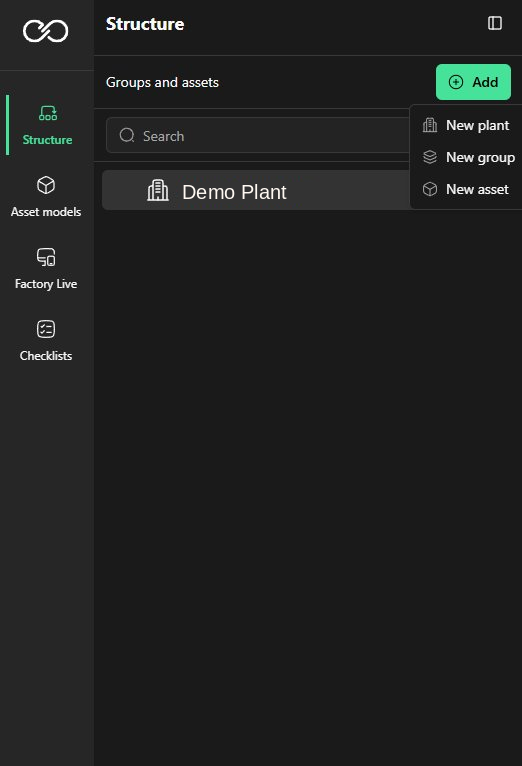
1. Go to Structure.
2. Select New Plant to start a new structure.
3. Set a Name for the Plant.
4. Set the Country of the Plant.
5. Update the Operator Speed.
6. Update the Operator Diameter.
7. Select Add.
Documents on a Plant
You can assign documents to a Plant. All Asset Groups and Assets beneath the Plant then have
access to these documents via the AI chat function.
Was this article helpful?
That’s Great!
Thank you for your feedback
Sorry! We couldn't be helpful
Thank you for your feedback
Feedback sent
We appreciate your effort and will try to fix the article